DIY Newborn Photography: How to Take Professional Baby Photos at Home (2026)

DIY Newborn Photography: How to Take Professional Baby Photos at Home (2026)
Your baby is here. They're impossibly small, their features change by the hour, and you know — you know — you need to capture this. But a professional newborn studio shoot can run $400–$1,500+, and you've already spent that on a crib, a car seat, and approximately forty-seven onesies.
Here's the truth: you don't need a studio. With the right setup, a little patience, and the tips in this guide, you can take stunning newborn photos at home that you'll treasure forever. We'll walk you through everything — gear, lighting, safe posing, camera settings, props, and editing — so your very first DIY newborn photoshoot feels achievable, not overwhelming.
Let's do this.
Why DIY Newborn Photography Works
Professional photographers have the same tools you do: light, a camera, and a patient eye. What they've mastered is knowing what to look for — and that's exactly what this guide teaches you.
The sweet spot for newborn photography is days 5–14 after birth. Babies sleep deeply, curl naturally, and still have that fresh, pouty newborn look. After two weeks, they become more alert (and more opinionated) about being posed. So if your baby is in that window right now — you're in the perfect position to start.
What Gear Do You Actually Need?
You don't need to buy anything new. Here's what works:
Camera Options (pick one)
- Modern smartphone (iPhone 14+, Google Pixel 7+, Samsung Galaxy S22+): Portrait mode + RAW shooting capability makes these genuinely capable.
- DSLR or mirrorless camera you already own: Any entry-level Canon, Nikon, or Sony body works beautifully.
- Point-and-shoot: Even older compact cameras with manual modes can shine with good lighting.
Essential Accessories
- Tripod or phone stand — frees your hands and eliminates blur
- Remote shutter or self-timer — reduces camera shake
- White foam board (from any craft store, ~$2) — reflects light beautifully
- Muslin or jersey wrap fabric — soft, stretchy, and easy to fold
- Beanbag or firm pillow — the newborn posing surface of choice
What You DON'T Need
- Ring lights (they create harsh, unflattering catchlights in baby's eyes)
- Expensive backdrops (a simple cream blanket on a bed looks stunning)
- Flash (ever — more on this below)
Setting Up Your Home Studio Space
The best newborn photography setups are usually the simplest. Here's how to build one in any room:
Step 1: Find Your Window
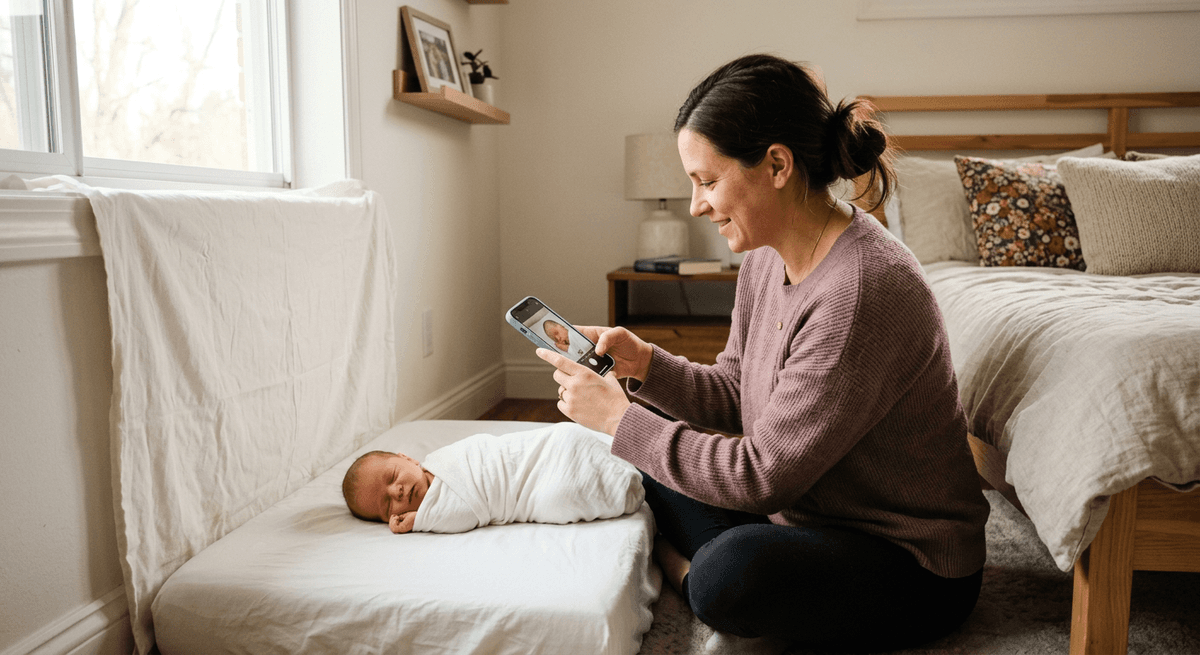
Natural light is your best friend. Look for a large window that doesn't get direct sunlight — a north-facing window or a window with sheer curtains is ideal. Direct sun creates harsh shadows; diffused window light creates that soft, glowing look you see in professional newborn photos.
Set up your shooting surface about 2–4 feet from the window, facing it. This gives you even, beautiful light across the baby's face and body.
Step 2: Prepare Your Surface
- Place a firm beanbag (or a folded blanket over a firm surface) near the window
- Layer it with a neutral-colored blanket — cream, grey, or soft white photograph best
- Have a second wrap or blanket nearby to tuck and fold around baby
Step 3: Control the Room Temperature
Newborns are most comfortable (and sleepy) when the room is 75–80°F (24–27°C). A warm room = a sleeping baby = better photos. Turn up the heat, use a space heater on low nearby (never directly aimed at baby), and keep drafts out.
Step 4: White Balance Your Shoot
If you're shooting on a phone, set your white balance manually or use the "Auto" setting — just make sure your screen looks natural, not orange or blue. On a DSLR, set white balance to "Cloudy" for window light — it adds just a touch of warmth.
Lighting: The One Skill That Changes Everything
Lighting separates good baby photos from great baby photos. Here's a simple system:
Main Light: Your window. Position baby so the light falls across their face at a slight angle (not flat-on, not 90° side-lit).
Fill Light: Hold your white foam board on the opposite side of the baby from the window. It bounces light back into the shadows, softening them. This single $2 trick is used by professional photographers constantly.
Background Light: Keep your background slightly further from the window than your subject. This naturally creates a soft background that falls just slightly darker than the baby — beautiful and professional-looking.
What to avoid:
- Overhead room lights (creates uneven color)
- Flash or ring lights (too harsh for newborns)
- Shooting in a dark room and trying to brighten in editing (creates grain/noise)
Safe Posing for Newborn Photography at Home
This is the most important section. Newborn safety is always the first priority. These guidelines come from professional newborn photographers:
The Golden Rules
- Never leave baby unattended on any elevated surface — not even for a second
- Support the head at all times — newborns have very limited neck control
- Never force a pose — if baby resists, try a different position
- Skip composite poses at home — the "froggy pose" (hands under chin, elbows out) and "potato sack" poses require professional training and spotters. Leave these to the pros.
- Watch for cues — fussing, color changes, or stiffening means stop and soothe
Beginner-Safe Poses That Look Amazing
Side-lying: Baby on their side, knees tucked up toward chest, hands near face. Beautifully natural and safe. Capture from slightly above.
Back pose (taco wrap): Baby swaddled snugly, laid on their back, shot from directly above. The aerial view shows off tiny features and the whole swaddled body.
On the chest: Place baby on a parent's chest for the ultimate bonding shot. Parent lies back, baby rests on their chest facing up or nuzzled in. Capture from the side or above.
In parent's hands: Cup baby in both hands (with an extra spotter nearby). Shoot from above looking down. This showcases just how tiny they really are.
Close-up details: Tiny feet. Curled fingers. Pursed lips. Profile of the face against a soft blanket. These macro-style shots require no posing at all — just patience and a steady hand.
Camera Settings That Actually Work
For Smartphones
- Turn on Portrait Mode for natural background blur
- Tap on baby's face to set focus and exposure
- If your phone supports it, shoot in RAW for more editing latitude
- Turn HDR off — it can over-process skin tones
For DSLR / Mirrorless
- Aperture: f/2.8–f/4. This gives beautiful background blur while keeping the whole baby in focus.
- Shutter speed: 1/200s or faster to freeze any small movements
- ISO: Keep as low as possible (ISO 100–400) near a window. Raise to 800 only if needed.
- White balance: Cloudy or Shade preset for warm, natural skin tones
- Focus mode: Single-point AF. Place the focus point on baby's eye (or the nearest eye in side-lying poses).
- Shoot RAW if your camera supports it — gives you far more control in editing
Props That Don't Feel Cheesy
Less is more with newborn props. The best ones feel natural, not staged:
Wraps: Jersey knit, muslin, or cheesecloth in neutral tones (cream, beige, sage green, dusty pink). These photograph beautifully and are easy to order on Etsy for $10–20.
Baskets and crates: A lined wicker basket with a soft insert creates a timeless look. Always test stability before placing baby inside, and never leave baby alone.
Meaningful objects: A parent's wedding ring next to baby's hand. A tiny pair of shoes. A family heirloom. These personal props make the most memorable photos.
Florals: Fresh or dried flowers around (but not directly on) baby add softness. Keep petals away from baby's face and mouth.
What to skip: Elaborate headbands with hard elements, heavy hats that cover the face, or anything uncomfortable. If baby keeps pulling it off, the photo is telling you something.
Budget Breakdown: DIY Newborn Shoot for Under $50
| Item | Cost | |------|------| | White foam board (2–3 boards) | $6 | | Muslin wrap (Etsy or Amazon) | $12 | | Neutral blanket or layer | Already own / $15 | | Beanbag (or repurpose existing) | Already own / $20 | | Tripod phone mount | $10–20 | | Total | $28–$53 |
Compare that to a professional session ($400–$1,500+) and you're looking at serious savings — while still getting photos you'll print and frame.
Editing Your Newborn Photos
Good editing enhances your photos. Great editing is invisible — you shouldn't be able to tell it was done.
Free & Easy Options
- Lightroom Mobile (free): Best overall option. Adjust exposure, shadows, white balance, and skin tones with ease.
- Snapseed (free): Great for quick edits on mobile. The "Portrait" tool does a nice job smoothing skin.
- VSCO (free tier): Clean, filmy presets that work well for warm, natural newborn photos.
The Basic Edit Recipe
- Exposure: Bring it up slightly — newborn photos tend to feel lighter and airier
- Highlights: Reduce to recover any blown-out window areas
- Shadows: Lift slightly to open up dark areas
- White Balance: Nudge warmer (more yellow/amber) for a cozy, golden feel
- Skin tone: Use HSL sliders to make orange/red tones slightly less saturated — reduces redness in newborn skin
- Sharpness: Subtle — you want softness in newborn photos, not hyper-sharp detail
Make It Even Easier with BabyGenic AI
Once you've got your photos, BabyGenic AI can transform them into artwork — think watercolor portraits, illustrated prints, whimsical storybook styles, and more. Upload your best shot from today's session and see it reimagined in seconds.
🎨 Try BabyGenic AI free — turn your best home newborn photo into a stunning piece of wall art you can print and frame.
FAQ: DIY Newborn Photography at Home
Q: What's the best time of day to shoot? Morning light is typically softest and most consistent. Aim for 9 AM–11 AM when your window gets indirect, diffused daylight. Avoid afternoon light from west-facing windows — it gets harsh and orange.
Q: My baby won't stop crying. What do I do? Stop the shoot. Feed, burp, and soothe first. A drowsy, full baby is the easiest newborn subject in the world. Try again in 20–30 minutes. Don't rush — stress shows in photos.
Q: Do I need a fancy camera, or will my phone work? A modern smartphone is genuinely excellent for newborn photography. The iPhone 15 Pro, Google Pixel 8, and Samsung Galaxy S24 all shoot portraits that rival entry-level DSLRs in good light. Use Portrait Mode, keep the room bright, and you'll be amazed at the results.
Q: Is it safe to pose newborns in baskets? Yes, with precautions. Always line the basket with soft padding, ensure the basket is stable and on the floor (or a low surface), and never leave baby unattended. Keep your hands within reach at all times.
Q: How long should a home newborn session take? Plan for 2–3 hours, including feeding breaks. Don't try to rush it. The most relaxed baby makes the best subject, and that takes time. If you only get 30 minutes of active shooting, that's fine — quality over quantity.
Q: What if my photos still look amateur after editing? Focus on two things: light and focus. If your light is soft and directional (window, foam board reflector), and your focus is sharp on baby's eyes, the photo will look professional regardless of camera or editing. Most "amateur-looking" photos are actually a lighting problem, not a camera problem.
The Photos You'll Treasure Most
Here's something no photography guide tells you: the imperfect photos often become the most loved ones. The one where baby made a face. The one where your partner's hand is visible in the frame. The shot you almost deleted because the background wasn't quite right.
Capture everything. Edit the best ones. Print a few. The memories matter more than the technique.
And when you've got your favorite shot — the one that perfectly captures these impossibly fleeting first days — consider doing something beautiful with it.
Turn Your Best Shot Into Art with BabyGenic AI
BabyGenic AI takes your home newborn photos and transforms them into professional-quality artwork — watercolor portraits, illustrated prints, storybook scenes, and more. No Photoshop skills needed. Just upload, choose a style, and download a print-ready file in minutes.
It's the perfect complement to your DIY newborn shoot. You did the hard work of capturing the moment. Let BabyGenic AI turn it into something you'll hang on the wall forever.
👶 Create your first baby portrait → — free to try, stunning results.
Have questions about your DIY newborn session? The BabyGenic AI team is here to help. Visit babygenic.ai to explore portrait styles, get inspiration, and create something beautiful from your best moments.